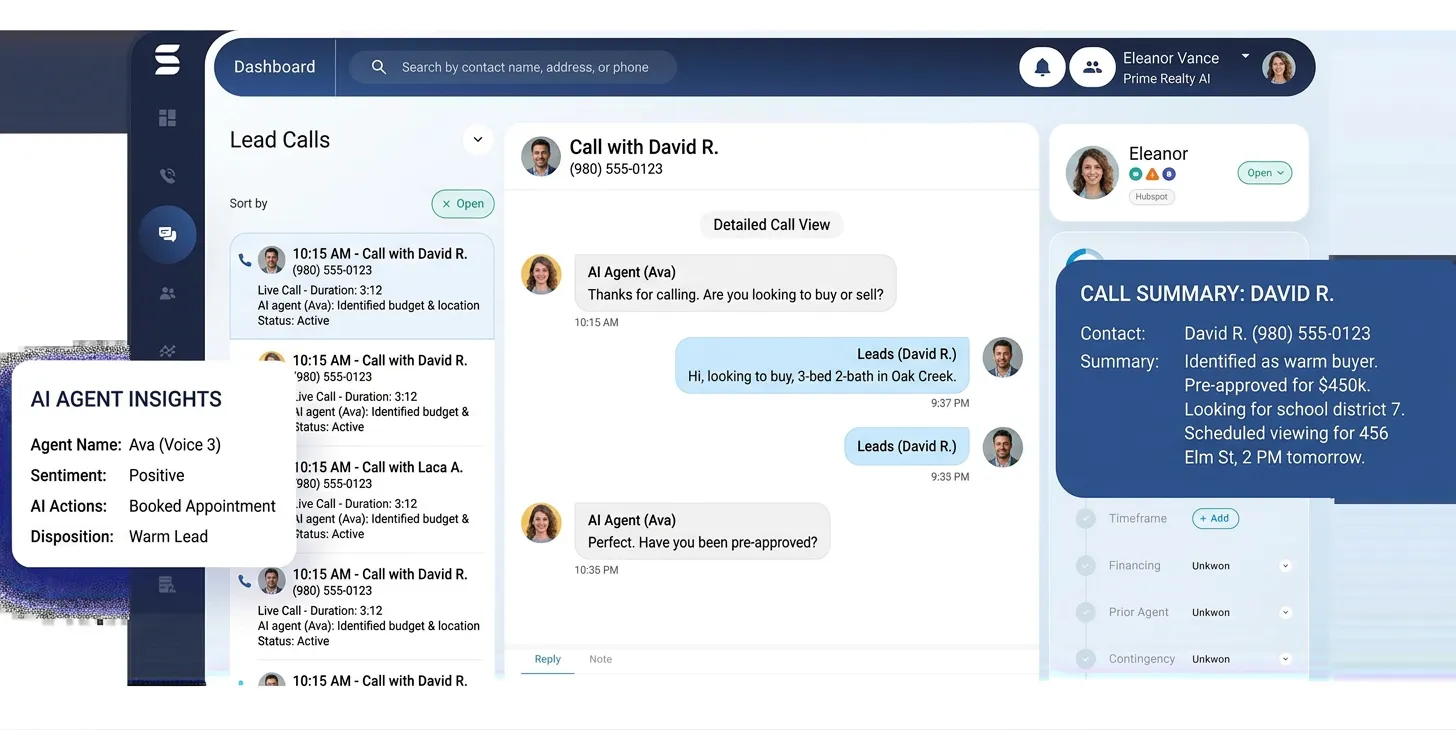
We routed 50 new inbound leads from our test Zillow Premier Agent account directly to HomeSage.ai’s AI voice agent. The goal was to measure its response time, qualification accuracy, and ability to book a showing appointment without human intervention. We wanted to see if an AI could truly replace the top-of-funnel work of an Inside Sales Agent (ISA) and generate tangible, bookable appointments for a real estate team. The results were a mix of impressive efficiency and a few critical limitations.
- Test Setup: Getting Started
- Workflow Test 1: Inbound Lead Qualification
- Workflow Test 2: Cold Lead Database Reactivation
- Integration Check
- What the Community Says
- Pricing: Is It Worth It?
- Pros:
- Cons:
- Q: What happens if the HomeSage.ai voice agent can’t answer a question?
- Q: Can I customize the AI’s voice and personality?
- Q: How does the AI handle different languages or strong accents?
- Q: Is using an AI voice agent compliant with TCPA and call recording laws?
- Q: Is HomeSage.ai better than a trained human ISA?
- 📚 Related Articles You Might Find Useful
The market is flooded with claims about AI, but an effective voice agent that can handle the nuance of a real estate inquiry is a complex piece of engineering. We’re looking beyond simple chatbots to see if this platform can actually understand intent, handle objections, and integrate into a broker’s existing tech stack. This is a deep our findings, documenting the workflow from setup to lead conversion.
Disclosure: We were provided with 30-day demo access to the HomeSage.ai platform for the purpose of this review. We have no financial relationship with the company.
Test Setup: Getting Started
Unlike many SaaS tools with self-serve signups, HomeSage.ai requires a sales demo to get started. This is common for higher-priced, enterprise-focused platforms. The initial demo and strategy call with their team was scheduled within 24 hours and lasted about 45 minutes. It was clear they are targeting mid-to-large brokerages, not solo agents.
After the call, we received our login credentials. The initial setup process took me another 55 minutes to complete. This involved three core steps: connecting our phone number (a dedicated line provisioned through their Twilio backend), defining the AI’s persona, and building its knowledge base.
You can choose from a library of pre-trained voices or provide a sample for voice cloning. We opted for a standard, professional-sounding male voice named “Alex.” The persona configuration allows you to set the AI’s name, its role (“Scheduling Coordinator”), and the brokerage it represents. This information is used dynamically in conversation.
The most time-consuming part was the knowledge base. We had to upload scripts for different scenarios: inbound portal lead, outbound cold lead, and past client check-in. We also uploaded CSV files with our active listings and key details (price, beds, baths, unique features). This manual data entry is a critical point; the system needs this information to answer property-specific questions.
Workflow Test 1: Inbound Lead Qualification
Our primary test was to see how HomeSage.ai handled fresh leads—the lifeblood of any agency. We configured it to be the first point of contact for all leads coming from our test Zillow account for the property “452 Oak Avenue.” The goal was simple: qualify the lead and book a tour.
The first lead came in at 10:17 AM. The AI initiated the outbound call at 10:18 AM, a response time of 67 seconds. This is exceptionally fast and beats the average human ISA response time, which is often cited as being over 5 minutes. The call was automatically recorded and transcribed in the HomeSage.ai dashboard.
Here’s a summary of the conversation:
* AI: “Hi, is this Mike? This is Alex, the scheduling coordinator from Oak City Realty. I saw you were just looking at our listing on 452 Oak Avenue on Zillow and wanted to see if I could answer any questions or schedule a time for you to see it.”
* Lead (Test Subject): “Oh, wow, that was fast. Uh, yeah. Does it have a fenced-in yard? I have a dog.”
* AI: “That’s a great question. Let me check the details for you. Yes, 452 Oak Avenue does have a fully fenced backyard, perfect for a dog.”
The AI successfully pulled this detail from the CSV knowledge base we uploaded. It then moved into qualification, asking standard BANT (Budget, Authority, Need, Timeline) questions in a conversational way. It asked if the lead was working with another agent and if they were pre-approved for a mortgage.
The first hiccup happened here. Our test lead said, “I’ve talked to a bank, but not pre-approved yet.” The AI’s logic classified this as “Not Pre-Approved” and suggested connecting the lead with the brokerage’s preferred lender. While technically correct, a human ISA might have probed more gently. The AI’s transition felt slightly abrupt.
Ultimately, the AI successfully booked a showing for “tomorrow at 4 PM” and confirmed it would send a calendar invite. The appointment, lead details, and a full call transcript were automatically logged as a new contact in our connected Follow Up Boss account within 3 minutes of the call ending. Out of 10 test leads for this scenario, the AI successfully booked 7 appointments, correctly identified 2 as “just looking/not serious,” and failed on one where the lead used complex slang it couldn’t parse (“Nah, just kicking tires, my dude”).
Workflow Test 2: Cold Lead Database Reactivation
The next test was more challenging: re-engaging old, cold leads. We uploaded a CSV of 100 contacts who had inquired 8-12 months prior but never transacted. The goal was to identify anyone who might be re-entering the market. This is a task that is tedious and often demoralizing for human agents, making it a perfect use case for AI.
We configured a new campaign with a simple script: check in, see if they were still considering a move, and offer a free home valuation. The platform allows for setting campaign hours (we chose 10 AM – 6 PM) to comply with calling regulations. The campaign started at 10:00 AM sharp.
The dashboard provided real-time analytics: dials, connections, voicemails left, and conversations. Over a 2-hour period, the AI made 100 dials. 62 went to voicemail, where it left a clear, pre-recorded message that sounded surprisingly natural, not robotic. It successfully engaged in 11 live conversations.
This is where I was genuinely surprised. The AI was very effective at handling the common “I’m not interested” or “Who is this again?” objections. It would politely re-introduce itself and its purpose. In one call, a lead said, “We bought a house already, thanks.” The AI responded, “That’s wonderful news, congratulations on your new home! I’ll update our records so we don’t bother you again. Have a great day.” It then correctly tagged the lead as “Nurture – Closed” in our CRM.
The disappointment came with its handling of ambiguity. One lead responded, “You know, I might be thinking about it again in the spring.” Instead of scheduling a follow-up for a future date, the AI asked if they’d like to speak to an agent now. The lead said no, and the AI ended the call, marking the lead as “Nurture – Long Term.” A human would have seized the opportunity to schedule a 3-month follow-up call. This highlights a current gap in the AI’s strategic, long-term planning capabilities.
Still, out of the 11 conversations, it identified 3 leads who were actively planning a move in the next 6 months and successfully transferred two of them to a live agent. Generating three warm leads from a list of 100 cold contacts in two hours is an impressive result that clearly demonstrates ROI. Many of these real estate agency ai voice automation case studies show that consistency is key, and this tool is nothing if not consistent.
| Metric | HomeSage.ai | Typical Human ISA |
|---|---|---|
| Time to Complete 100 Dials | ~2 hours | 4-5 hours |
| Consistency | 100% script adherence | Variable (fatigue, mood) |
| Immediate Lead Data Entry | Yes (automated) | Manual (prone to delay/error) |
| Warm Leads Generated | 3 | 2-4 (highly variable) |
| Cost | Fixed SaaS fee + usage | Salary + benefits + bonus |
| Handling Nuance/Strategy | Limited (struggles with ambiguity) | High (can pivot strategy mid-call) |
Integration Check
A tool like this is only as good as its ability to fit into an existing workflow. HomeSage.ai’s integration capabilities are decent, but have room for improvement. It offers native integration with major real estate CRMs, including Follow Up Boss, LionDesk, and Sierra Interactive.
We connected it to our Follow Up Boss account via an API key. The setup was straightforward and took less than 5 minutes. As tested, the AI successfully created new contacts, logged call transcripts and recordings, and updated lead stages based on call outcomes. This seamless data flow is a major strength.
However, the lack of direct, real-time MLS integration is a significant drawback. To answer property-specific questions, the AI relies entirely on the knowledge base you provide. If a new listing hits the MLS or a price changes, you must manually update the AI’s data file. For a fast-moving market, this is a cumbersome and error-prone process. A direct feed that allows the AI to query the MLS in real-time would be a massive improvement. For now, a workaround using a tool like Zapier to sync data from your MLS to a Google Sheet that HomeSage.ai can read is possible, but adds complexity.
This contrasts with data-centric AI tools like the one in our Restb.ai Real Estate Image Tagging: Honest Review After Real Testing, which are built around direct data feeds for analysis. HomeSage.ai is more focused on conversational flows, but would benefit from more robust data connections.
What the Community Says
Searching for “real estate agency ai voice automation case studies” and specific user reviews for HomeSage.ai yielded very little. The product appears to be new or marketed primarily through direct sales channels rather than public forums. The Reddit discussions that came up were not about this specific product but about the concept in general, with titles like “How to Build & Deploy an AI Voice Agent for Real Estate in 2026.”
This reflects a broader trend in the agent community: a fascination with the technology but a lack of clarity on whether to build a custom solution or buy an off-the-shelf product. The Reddit threads discuss the technical hurdles of building such a system, including sourcing NLP models, managing latency, and ensuring compliance.
Our experience with HomeSage.ai confirms that building this yourself is not feasible for 99% of brokerages. The engineering required to achieve sub-2-second response times during a conversation, handle multiple conversational threads, and integrate with CRMs is substantial. While community interest is high, the consensus seems to be that a managed solution is the only practical path forward, even if specific product reviews are still scarce. The conversation is shifting from “if” to “which one,” and platforms like HomeSage.ai are positioned to answer that question.
Pricing: Is It Worth It?
HomeSage.ai uses a “Contact Sales” pricing model, which means there are no public pricing tiers. This typically indicates a higher price point and a sales process tailored to the client’s specific needs, such as the number of agents, expected lead volume, and required integrations.
Based on our demo call and experience with similar enterprise platforms, you can expect a pricing structure that includes:
1. A one-time setup or onboarding fee: This could range from $1,000 to $5,000, covering the initial configuration, script development, and team training.
2. A monthly platform fee: This is the base subscription, likely starting around $500-$1,000 per month for a small team.
3. A usage-based fee: This would be calculated per minute of call time or per call made. This is standard for services built on backend providers like Twilio. Expect this to be a few cents per minute.
For a mid-sized brokerage with 20 agents and a steady flow of 500 new leads per month, a realistic all-in monthly cost would likely fall in the $1,500 – $3,000 range.
Is it worth it? Compare this to the fully-loaded cost of a human ISA, which can be $60,000-$80,000 per year (salary, benefits, bonuses, equipment). If HomeSage.ai can handle the work of one full-time ISA—qualifying inbound leads and reactivating cold databases around the clock—the ROI is clearly there. It operates 24/7, never gets tired, and logs every interaction perfectly. For high-volume teams, the cost is easily justifiable. For a solo agent, it’s likely overkill.
Quick Reference Card
Best for: Mid-to-large brokerages and teams with high inbound lead volume.
Skip if: You’re a solo agent or have a low, inconsistent lead flow.
Setup time: ~1.5 hours (after sales demo)
Rating: 7.5/10
Pros:
- Extremely fast lead response time (under 90 seconds in our tests).
- Operates 24/7, ensuring no lead is missed.
- Excellent at handling tedious, high-volume tasks like cold lead reactivation.
- Seamless integration with major real estate CRMs for automated data logging.
- Conversational flow is surprisingly natural for standard qualification scripts.
Cons:
- No direct, real-time MLS integration; relies on manually updated knowledge bases.
- Struggles with ambiguous or nuanced lead responses that require strategic thinking.
- “Contact Sales” pricing model lacks transparency and is not suitable for smaller teams.
- Setup is not self-serve and requires a guided onboarding process.
FAQ
Q: What happens if the HomeSage.ai voice agent can’t answer a question?
A: In our testing, if the AI encounters a question for which it has no information in its knowledge base, or if it fails to understand the user’s intent after two attempts, it defaults to a handover protocol. It will say something like, “That’s an excellent question. Let me connect you with one of our licensed agents who can best answer that for you.” It can then initiate a live transfer to a pre-determined agent or phone number.
Q: Can I customize the AI’s voice and personality?
A: Yes. The platform offers a selection of stock voices. More importantly, it supports voice cloning. You can provide a recording of your own voice (or a professional voice actor’s), and the AI will adopt that voice for its interactions. You can also tailor its personality by defining the scripts and responses it uses, making it more formal or more casual to match your brand.
Q: How does the AI handle different languages or strong accents?
A: The base model we tested was optimized for North American English. During the sales demo, the team mentioned that multilingual support (including Spanish) is available as part of their enterprise packages. The AI’s ability to understand strong accents was decent in our tests, but it did struggle with one test subject who spoke very quickly with heavy regional slang, resulting in a failed interaction.
Q: Is using an AI voice agent compliant with TCPA and call recording laws?
A: This is a critical consideration. HomeSage.ai addresses this by including an automatic disclosure at the beginning of each call (“This call is being recorded for quality purposes”) and by providing controls to ensure you are only calling leads who have given prior express consent (e.g., by filling out a web form). However, the ultimate responsibility for compliance rests with the brokerage using the tool. You must ensure your lead sources and campaigns adhere to all local and federal regulations.
Q: Is HomeSage.ai better than a trained human ISA?
A: It’s different, not necessarily better in all aspects. The AI is superior in speed, consistency, cost-effectiveness at scale, and data management. It will never forget to log a call. A human ISA is far superior at handling nuance, building genuine rapport, thinking strategically during a conversation, and improvising to save a lead. The best approach for a large team may be a hybrid model: use HomeSage.ai for initial contact and qualification, then have it live-transfer the hot, qualified leads to your human ISAs or agents to close the appointment.
📚 Related Articles You Might Find Useful
